Project Management
7 Best Project Management Software for Remote Teams in 2026 (Tested & Ranked)
Managing a remote team without the right software is exhausting.
The 7 Best Project Management Software for Remote Teams in 2026 (Tested & Ranked)
Managing a remote team without the right software is exhausting.
You’re chasing updates across Slack, email, and spreadsheets. Deadlines slip. Nobody knows who owns what. Sound familiar?
I’ve tested over 20 project management tools to find the ones that actually work for distributed teams. Here are the 7 that make remote collaboration feel easy — not painful.
Quick note: The best tool depends on your team size, workflow, and budget. I’ll break down every option so you can pick the right one for your situation.
Top Picks at a Glance
- Monday.com — Best overall for remote teams with complex workflows
- Asana — Best for async-first, distributed teams
- ClickUp — Best feature-rich option for teams on a budget
- Basecamp — Best for keeping things simple
- Wrike — Best for large enterprise remote teams
- Notion — Best for documentation-heavy teams
- Linear — Best for remote engineering teams
1. Monday.com — Best Overall for Remote Teams
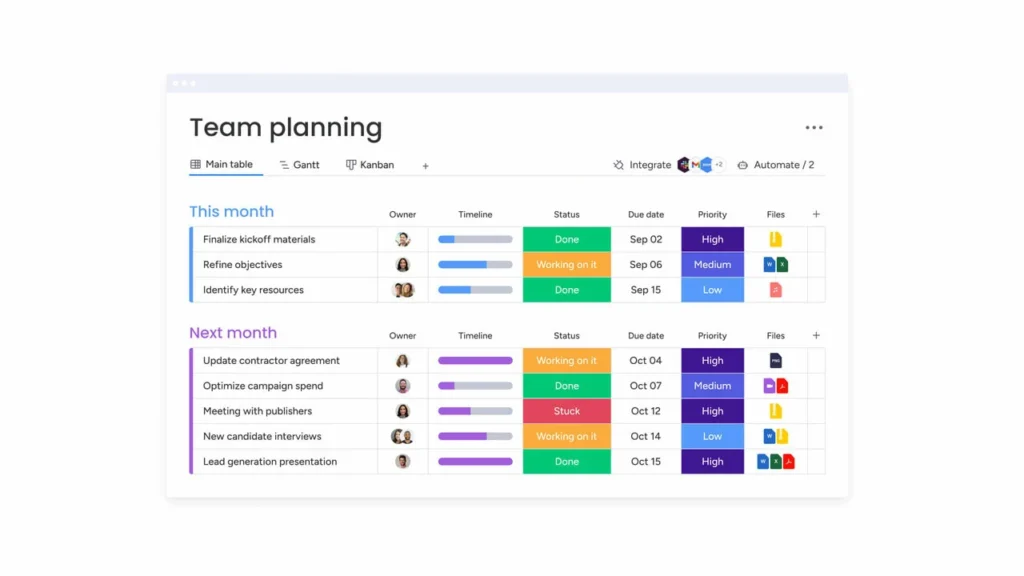
Monday.com is a work operating system that lets remote teams build custom workflows without writing a single line of code. It’s flexible enough for marketing, ops, HR, and product teams all at once.
What sets it apart for remote work? Two things: its real-time dashboards and its automation engine. Your team in Tokyo sees the same board as your team in London — always up-to-date, no manual syncing required.

Why Remote Teams Love Monday.com
- Multiple views for every preference — Kanban, Gantt, timeline, calendar, and workload views so everyone can work how they want
- Automations that save hours — Auto-assign tasks, send status updates, and trigger Slack notifications without lifting a finger
- Time zone awareness — Deadline columns respect time zones so your Berlin team doesn’t get 3am notifications
- Guest access — Invite clients and contractors without giving them access to everything
The Catch
Monday.com’s pricing gets steep fast. The free plan is limited to 2 seats — not enough for any real team. And some advanced features (like time tracking and custom automations) require the Pro plan or higher.
Monday.com Pricing (2026)
- Free — Up to 2 seats
- Basic — From $9/seat/month (billed annually)
- Standard — From $12/seat/month
- Pro — From $19/seat/month
- Enterprise — Custom pricing
G2 Rating: 4.7/5 (12,000+ reviews) · Capterra: 4.6/5
2. Asana — Best for Async-First Remote Teams
If your team spans multiple time zones and rarely works synchronously, Asana was practically built for you. It’s the go-to choice for teams that rely on clear task ownership, structured workflows, and zero-meeting updates.
Asana excels at making async work feel coordinated. You can see exactly what everyone is working on without interrupting them with status-check messages.

Why Remote Teams Love Asana
- Clear ownership on every task — One assignee, one due date, clear accountability even across time zones
- Workflow Builder — Build automated workflows with an intuitive visual editor — no code needed
- Status updates without meetings — Project status reports go out automatically, so stakeholders stay informed without a single Zoom call
- Inbox that actually works — See every action, @mention, and comment in one place instead of hunting through email
The Catch
Asana’s free plan is generous but lacks timeline/Gantt views. For a remote team doing complex project planning, you’ll likely need the Starter plan at minimum.
Asana Pricing (2026)
- Personal — Free for up to 10 users
- Starter — $10.99/user/month (billed annually)
- Advanced — $24.99/user/month
- Enterprise / Enterprise+ — Custom pricing
G2 Rating: 4.4/5 (10,000+ reviews) · Capterra: 4.5/5
3. ClickUp — Best for Feature-Rich Teams on a Budget
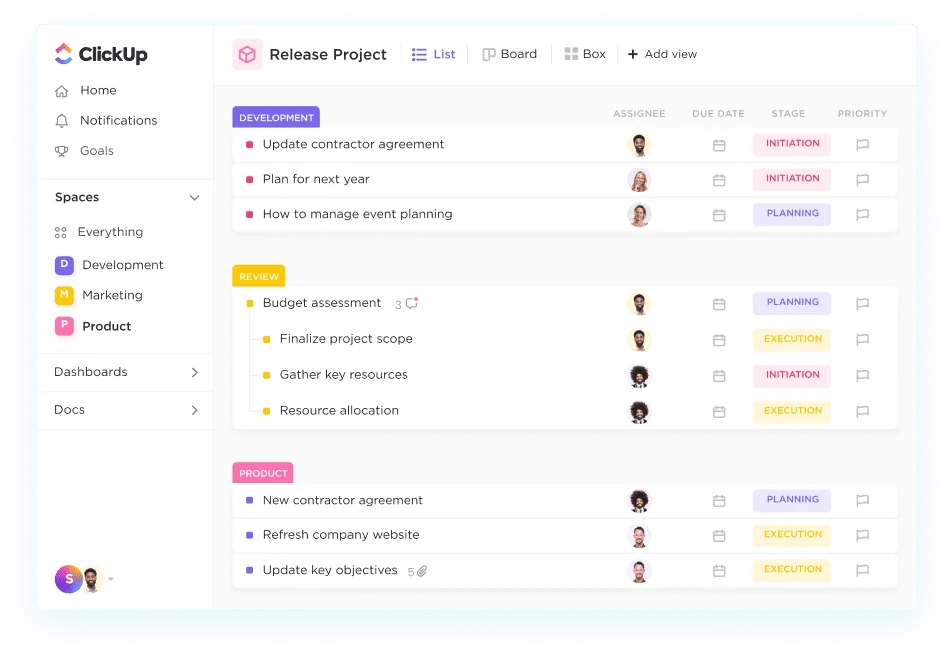
ClickUp is the Swiss Army knife of project management. It packs an absurd number of features into one platform — tasks, docs, whiteboards, goals, time tracking, chat, and more — all at a price point that makes enterprise tools look overpriced.
For remote teams that need a tool that can do everything without paying for five separate apps, ClickUp is hard to beat.
Why Remote Teams Love ClickUp
- Custom views for everything — List, Board, Calendar, Gantt, Timeline, Workload, Map, and more
- ClickUp AI — Summarizes tasks, writes project updates, and helps teams move faster without extra meetings
- Everything in one place — No need for a separate docs tool, chat app, or time tracker
- Generous free tier — The free plan includes unlimited tasks and members (with storage limits)
The Catch
ClickUp has a steep learning curve. The sheer number of features can overwhelm new users. Many remote teams go through a 2-3 week adjustment period before they find their groove.
ClickUp Pricing (2026)
- Free — Unlimited members, limited storage
- Unlimited — $7/user/month (billed annually)
- Business — $12/user/month
- Enterprise — Custom pricing
G2 Rating: 4.7/5 (9,000+ reviews) · Capterra: 4.6/5
4. Basecamp — Best for Teams Who Want to Keep It Simple
Basecamp takes a radically different approach to project management. Instead of thousands of features, it gives you six core tools — to-dos, messages, schedules, files, campfire chat, and a card table — and that’s it.
For remote teams drowning in feature overload, Basecamp is refreshingly straightforward. New team members are productive within an hour of signing up.

Why Remote Teams Love Basecamp
- The Hill Chart — A unique progress tracker that shows not just what’s done, but whether your team is over the hardest part of a project
- Everything is searchable — Every message, file, and to-do is indexed and searchable company-wide
- Flat-rate pricing — At $299/month for unlimited users, it’s a steal for larger remote teams
- Built-in message board — Replace half your Slack channels with structured, threaded messages that don’t disappear
The Catch
Basecamp intentionally limits customization. If you need Gantt charts, dependencies, or complex workflows, you’ll hit walls quickly. It works best for teams with relatively straightforward projects.
Basecamp Pricing (2026)
- Basecamp — $15/user/month (billed annually)
- Basecamp Pro Unlimited — $299/month flat fee (unlimited users + 5TB storage)
👉 Try Basecamp free for 30 days
G2 Rating: 4.1/5 (5,000+ reviews) · Capterra: 4.3/5
5. Wrike — Best for Large Enterprise Remote Teams

Wrike is enterprise-grade project management built for organizations that need security, compliance, and control at scale. Fortune 500 companies use it to coordinate hundreds of people across dozens of projects simultaneously.
For large remote teams — think 50+ people — Wrike’s approval workflows, audit trails, and resource management features are hard to match.

Why Remote Teams Love Wrike
- Real-time collaboration — Live editing, @mentions, and instant notifications keep distributed teams in sync
- Cross-project visibility — Executive dashboards that roll up every project in one view — perfect for remote managers
- Proofing and approvals — Built-in markup tools for reviewing documents, images, and videos without leaving the platform
- Enterprise security — SSO, two-factor authentication, and granular permissions for large organizations
The Catch
Wrike is complex, and the learning curve shows. Expect a dedicated onboarding period. It’s overkill for small teams and the mid-tier pricing ($10+/user/month) adds up fast at scale.
Wrike Pricing (2026)
- Free — Up to 5 users
- Team — From $10/user/month (2–25 users)
- Business — From $24.80/user/month
- Enterprise / Pinnacle — Custom pricing
G2 Rating: 4.2/5 (3,500+ reviews) · Capterra: 4.3/5
6. Notion — Best for Documentation-First Remote Teams
Notion started as a note-taking app and evolved into a full project management platform. If your remote team lives and dies by documentation — runbooks, wikis, SOPs, meeting notes — Notion is where they’ll thrive.
Think of it as a flexible workspace where your docs, tasks, and databases live together. No more “where did we put that doc?”
Why Remote Teams Love Notion
- Everything in one place — Project plans, meeting notes, wikis, and task boards side by side
- Notion AI — Ask questions about your workspace, generate content, and summarize long docs instantly
- Highly customizable — Build exactly the workspace your remote team needs, no dev skills required
- Great for knowledge management — New remote hires can onboard by reading the wiki instead of 10 Zoom calls
The Catch
Notion can feel overwhelming to set up. “Too much blank canvas” is a common complaint — you need to either spend time building templates or adopt a framework someone else built. It also lacks native Gantt/timeline views that dedicated PM tools offer.
Notion Pricing (2026)
- Free — Limited blocks for individuals
- Plus — $10/user/month (billed annually)
- Business — $15/user/month
- Enterprise — Custom pricing
G2 Rating: 4.7/5 (5,500+ reviews) · Capterra: 4.7/5
7. Linear — Best for Remote Engineering Teams
Linear is purpose-built for software development teams. It’s fast, opinionated, and laser-focused on helping engineers ship faster. Remote engineering teams love it because it cuts out the PM overhead that slows down sprint work.
Where Jira feels like enterprise bureaucracy, Linear feels like a tool engineers actually enjoy using.
Why Remote Dev Teams Love Linear
- Blazing fast UI — Keyboard shortcuts for everything. Average action takes under 2 seconds. Not a joke.
- Cycles (sprints) — Built-in sprint planning with automatic issue carry-over so nothing slips through the cracks
- GitHub/GitLab integration — Link PRs to issues automatically so code reviews and tickets stay in sync
- Triage workflow — Inbox-style triage so remote engineers start each day knowing exactly what’s on deck
The Catch
Linear is built for tech teams. Non-technical teams or cross-functional orgs might find it too narrow. It also lacks the rich visual customization that Monday.com or ClickUp offer.
Linear Pricing (2026)
- Free — Up to 250 issues
- Basic — $8/user/month (billed annually)
- Business — $14/user/month
- Enterprise — Custom pricing
G2 Rating: 4.7/5 (1,200+ reviews) · Capterra: 4.7/5
How to Choose the Right Tool for Your Remote Team
Here’s the honest answer: there’s no universal “best” tool. The right choice depends on who’s on your team and how you work.
Team size under 20? Start with Asana’s free plan or ClickUp’s free tier. Both are incredibly capable at no cost.
Team is 50+ people? Look at Wrike or Monday.com Enterprise. You’ll need the security controls and cross-project visibility.
Engineering team? Linear. Full stop. Nothing else comes close for developer workflow.
Want to keep things simple? Basecamp’s flat-rate Pro Unlimited is unbeatable value for teams that don’t need complex workflows.
Need docs + tasks in one place? Notion is the answer — especially if your team does a lot of async knowledge sharing.
Frequently Asked Questions
What is the best free project management software for remote teams?
ClickUp and Asana both offer generous free plans. ClickUp’s free tier includes unlimited members and unlimited tasks, making it the best free option for small remote teams. Asana’s free plan supports up to 10 users with most core features included.
Is Monday.com good for remote teams?
Yes. Monday.com is one of the best project management tools for remote teams, particularly for cross-functional teams managing complex workflows. Its real-time dashboards, automation features, and multiple project views make remote collaboration seamless.
What project management software do remote startups use?
Most remote startups start with either Notion (for its flexibility and docs+tasks combo), Asana (for structured task management), or Linear (for engineering teams). Monday.com and ClickUp are popular as teams scale past 15-20 people.
Is Basecamp still worth it in 2026?
Yes — especially at the Basecamp Pro Unlimited price of $299/month flat. For teams of 20+ people, that’s less than $15/person/month. The simplicity is a feature, not a bug, for teams that don’t want to spend hours configuring a tool.
How does Linear compare to Jira for remote teams?
Linear is significantly faster and simpler than Jira. Remote engineering teams consistently report higher satisfaction with Linear’s UI, keyboard shortcuts, and GitHub integration. Jira still wins for compliance-heavy enterprises that need granular audit logs.
The Bottom Line
The best project management software for your remote team is the one your team will actually use.
Here’s my final take:
- Start with Monday.com if you want a polished, all-in-one tool that works for any team type
- Choose Asana for async-heavy teams where task ownership and status updates matter most
- Pick ClickUp if you want every feature possible at the lowest price
- Go with Basecamp to eliminate tool complexity and get everyone on the same page fast
- Use Wrike if you’re a large organization that needs enterprise-grade controls
- Try Notion if your team runs on documentation and wants tasks to live in the same space
- Switch to Linear if your engineering team is still using Jira and you want them to love their tools again
All seven tools offer free plans or free trials. My advice? Sign up for your top two picks and run a 2-week trial with a real project. You’ll know immediately which one fits.
Good luck building your remote team’s workflow — you’ve got this.