Customer Support Software
Best Customer Feedback Tools for SaaS in 2026
Seven customer feedback tools for SaaS teams compared — Canny, Hotjar/Contentsquare, Survicate, Userpilot, Usersnap, Refiner and UserVoice — with pricing verified against each vendor's own page on 3 November 2026.
Most SaaS companies are collecting feedback wrong.
They put a feedback button in the corner. They send a quarterly NPS. They read G2 reviews when a renewal is at risk. Then they wonder why their roadmap feels like a coin flip.
Here’s the thing: the right feedback tool doesn’t just collect opinions. It connects what users say to what they do, who they are, and how much revenue they represent. Get that right, and every product decision gets sharper.
Below are seven customer feedback tools built for SaaS teams, compared on what they actually do and what they actually cost.
Pricing verified 3 November 2026 against each vendor’s own pricing page: Canny, Contentsquare, Survicate, Userpilot, Usersnap, Refiner, UserVoice. Where a vendor’s own pages disagree with each other, this article says so rather than picking a number.
- Best for feature request management: Canny
- Best for behavioral feedback (heatmaps + recordings): Hotjar / Contentsquare
- Best for multi-channel surveys: Survicate
- Best for in-app product analytics + feedback: Userpilot
- Best evidence-trail platform: Usersnap
- Best for micro-surveys targeting specific segments: Refiner
- Best for enterprise feedback tied to CRM revenue: UserVoice
How we chose these tools
Every tool on this list had to clear four bars:
- Built for SaaS. No generic survey tools that happen to have an API. These are built around product workflows, user segments, and recurring revenue metrics.
- Actual feedback loop. Collecting data isn’t enough. The tool had to help teams act on what they collected — through roadmaps, integrations, or prioritization scoring.
- Integrates with your stack. Slack, Intercom, HubSpot, Salesforce. If a tool lives in a silo, it dies.
- Published pricing. Tools that hide pricing behind “contact sales” for basic features got docked points.
We also looked at help desk platforms and form builder tools — because sometimes those handle simple feedback collection just fine. But for SaaS-grade feedback management, you need something more purpose-built.
1. Canny — Best for Feature Request Management
The verdict first: If you’re a SaaS company that needs to centralize feature requests, triage them by user impact, and keep customers in the loop on your roadmap — Canny is the best tool for this specific job.
Canny’s standout feature is Autopilot. Connect it to Gong, Intercom, Zendesk, Freshdesk, Zoom or Slack, and it reads customer conversations to pull out feature requests automatically. Your sales and support teams stop being the gatekeepers of product feedback. Canny lists Autopilot as included on all plans with unlimited sources — its integrations page advertises 50+ tools directly, plus thousands more through Zapier. (If you have seen “100+ sources” quoted for Autopilot, that figure is actually Canny’s Pro tracked-user limit, not an integration count.)

The public voting board is genuinely useful. Customers submit requests, vote for existing ones, and get email updates when you ship something they asked for. It closes the loop in a way that builds trust.
On revenue prioritization, be precise about what you’re buying. Canny’s named feature is Sort by MRR Impact — ranking requests by the revenue a feature affects. Connecting feedback to revenue with advanced reporting is a Pro-plan capability; tying feedback to opportunity revenue with HubSpot and Salesforce integrations sits at Business. The free plan does not include it.
What Canny is great at:
- Centralizing feedback from Gong, Intercom, Zendesk, Freshdesk, Zoom and Slack via Autopilot, on every plan
- Sort by MRR Impact — so you know which request is costing you the most revenue (Pro and above)
- Public-facing changelog to close the loop with customers who asked for shipped features
- Deduplication: Canny merges similar requests automatically so you get clean signal
- A genuinely usable free tier: 25 tracked users, 5 managers, unlimited boards, unlimited contributors and unlimited feedback
Where it falls short: Canny isn’t built for behavioral data. If you need heatmaps, session replay, or in-app surveys triggered by user behavior, you’ll need a different tool. Revenue reporting requires Pro, so the free tier won’t do prioritization work for you.
Pricing (November 2026): Free ($0 — 25 tracked users, 5 managers, unlimited boards); Pro $79/month billed yearly (100+ tracked users); Business custom. Canny’s page displays yearly billing by default and does not publish a standalone monthly figure for Pro. Full pricing.
Best for: B2B SaaS product teams managing a high volume of feature requests from multiple channels who need revenue-informed prioritization.
2. Hotjar / Contentsquare — Best for Behavioral Feedback
The verdict first: Contentsquare acquired Hotjar in September 2021, and the combined product is now a strong default for teams who want to see what users actually do on their site — not just what they say they want.
Heatmaps. Session replay. Surveys. Error monitoring. Funnel analysis. The free plan covers 200,000 sessions per month.
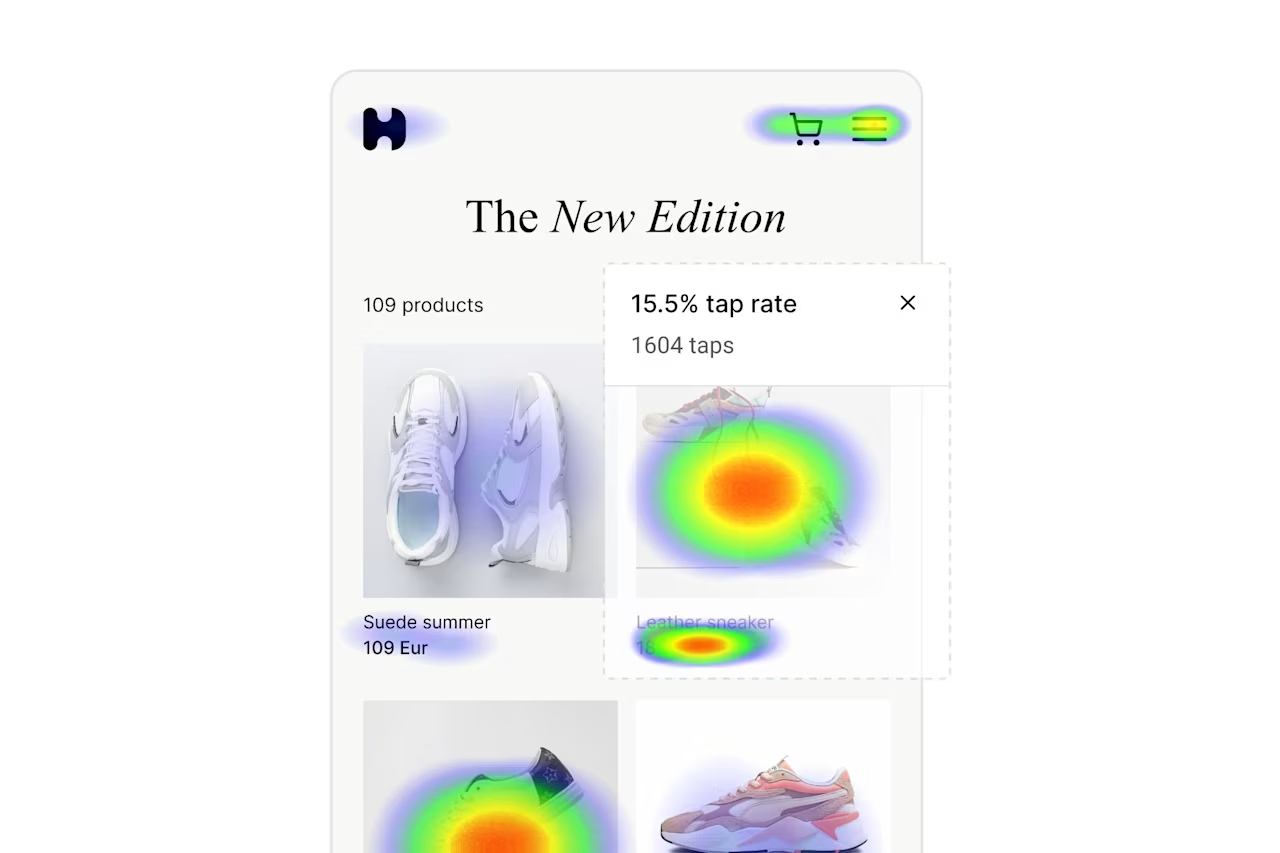
The Contentsquare Free plan is remarkable value. The legacy Hotjar free plan allowed 35 sessions per day — roughly 1,050 a month. Contentsquare’s free plan allows 200,000 sessions per month, nearly 190x more. You also get Attention Maps (showing engagement, not just clicks), error monitoring, funnel analysis, 100 survey responses and 5 user interviews a month, and 10+ integrations like Slack and Jira. Note that new Hotjar accounts can no longer be created — everyone starts on Contentsquare now.
What Hotjar/Contentsquare is great at:
- Heatmaps + Attention Maps for understanding page engagement, included on the free plan
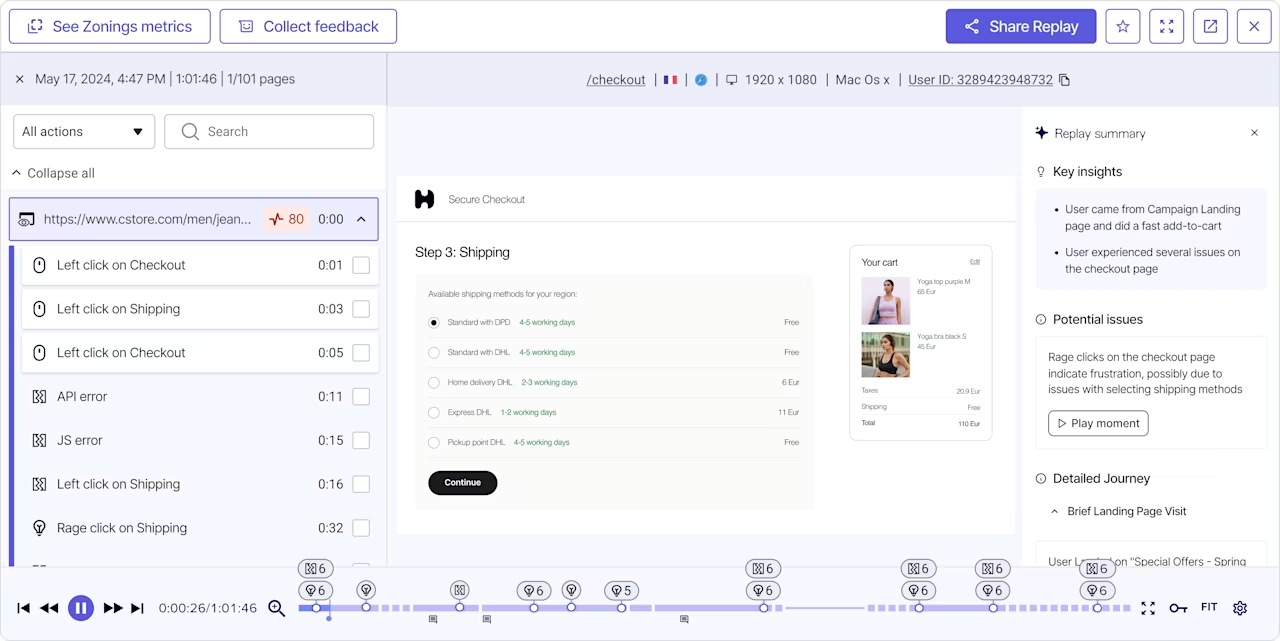
- Session replay that links to funnel drop-off data so you know why users leave
- In-app surveys (100 responses/month on free) and user interviews (5/month on free)
- Error monitoring: catch JavaScript errors before they kill your conversion rate
- Sense AI for instant summaries of recordings and heatmaps — note this is not on the free plan; Sense AI chat starts at Growth
Where it falls short: It doesn’t manage feature requests or give customers a place to vote on your roadmap. The survey tool is simple — not built for the deep, multi-condition targeting that Survicate or Refiner offer. Most of the Contentsquare product line beyond Experience Analytics Growth is custom-priced, so budgeting past the entry tier means a sales conversation.
Pricing (November 2026): Experience Analytics — Free $0 (200k sessions/month, 100 survey responses, 5 user interviews); Growth $49/month billed monthly or $39/month billed yearly; Pro and Enterprise custom. Voice of Customer starts from $79/month. Product Analytics is custom at every tier. Full pricing.
Best for: Any SaaS team that wants to understand user behavior on their web app. An easy yes at the free tier.
3. Survicate — Best for Multi-Channel Surveys
The verdict first: If your primary feedback workflow is surveys — NPS, CSAT, PMF, or custom — and you need to send them via email, in-app, and website simultaneously, Survicate is the most flexible tool on this list.

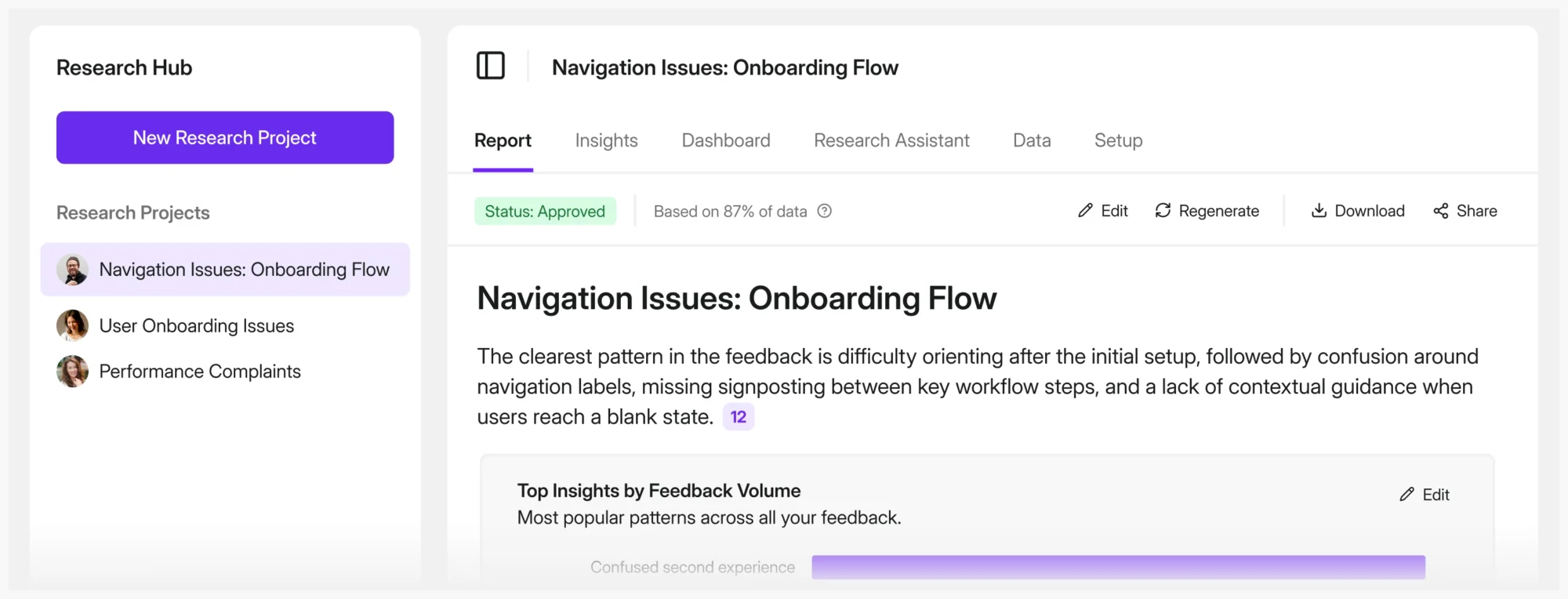
What sets Survicate apart is its approach to AI-powered analysis. The Research Hub automatically extracts themes from survey responses, support tickets, call transcripts, and G2 reviews — pulling them into a single feedback repository. You don’t just see individual responses; you see patterns across thousands of data points. It’s marked as included on every plan.
What Survicate is great at:
- Multi-channel survey distribution: email, website, in-app, mobile, all from one builder
- Automatic feedback enrichment with CRM and product data — segment responses by plan, MRR, or feature usage
- AI-generated topic clustering that finds trends you’d miss in manual analysis
- Research Hub included on every plan, not gated to the top tier
- Native integrations with HubSpot, Salesforce, Intercom, Amplitude, and more
- Strong compliance posture (ISO-certified, EU data storage)
Where it falls short: Survicate doesn’t do behavioral analytics. No heatmaps, no session replay. It’s a survey and analysis tool, not a UX research platform. Pricing also jumps steeply from Growth to Pro, which catches small teams off guard.
Pricing (November 2026): Growth $114/month billed annually; Pro $349/month (1,500 responses/month); Enterprise $569/month. A Starter tier exists — Survicate’s page metadata references pricing from $56/month — but no Starter plan card renders on the pricing page, so treat that figure as unconfirmed. 10-day free trial, all features, no card required, capped at 25 survey responses and 100 Research Hub data points. No free plan is listed on the pricing page.
One caveat worth knowing before you buy: Survicate’s own pricing page is internally inconsistent on the Growth plan’s response allowance — the plan card says 250 responses per month, while the comparison table on the same page says up to 500 per month with overage fees after. If response volume matters to your budget, get that number confirmed in writing. Full pricing.
Best for: Product and CX teams that run regular NPS/CSAT programs and need AI-assisted analysis across multiple feedback channels.
4. Userpilot — Best for In-App Product Feedback + Analytics
The verdict first: Userpilot is the tool for product teams who want feedback, product analytics, session replay, and in-app onboarding flows all in one platform. It’s more expensive than single-purpose tools, but it replaces several separate subscriptions.
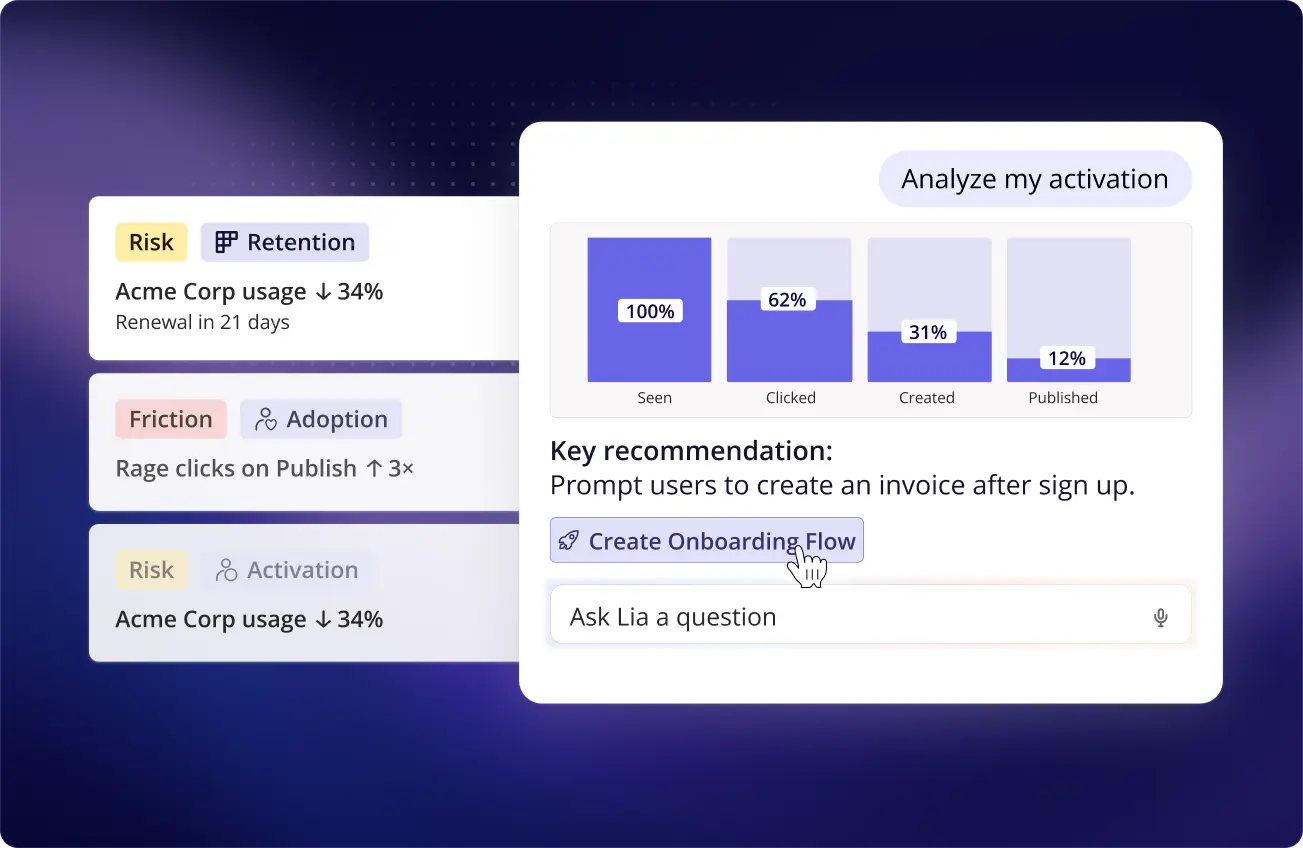
The big differentiator is Userpilot’s AI agent, Lia, which Userpilot describes as analyzing, advising and acting via pre-built skills across feature usage, funnel drop-off and NPS. Userpilot also ships an official MCP server, so you can query your Userpilot data from Claude, ChatGPT or Cursor — a genuinely useful capability if your team already works in those tools.
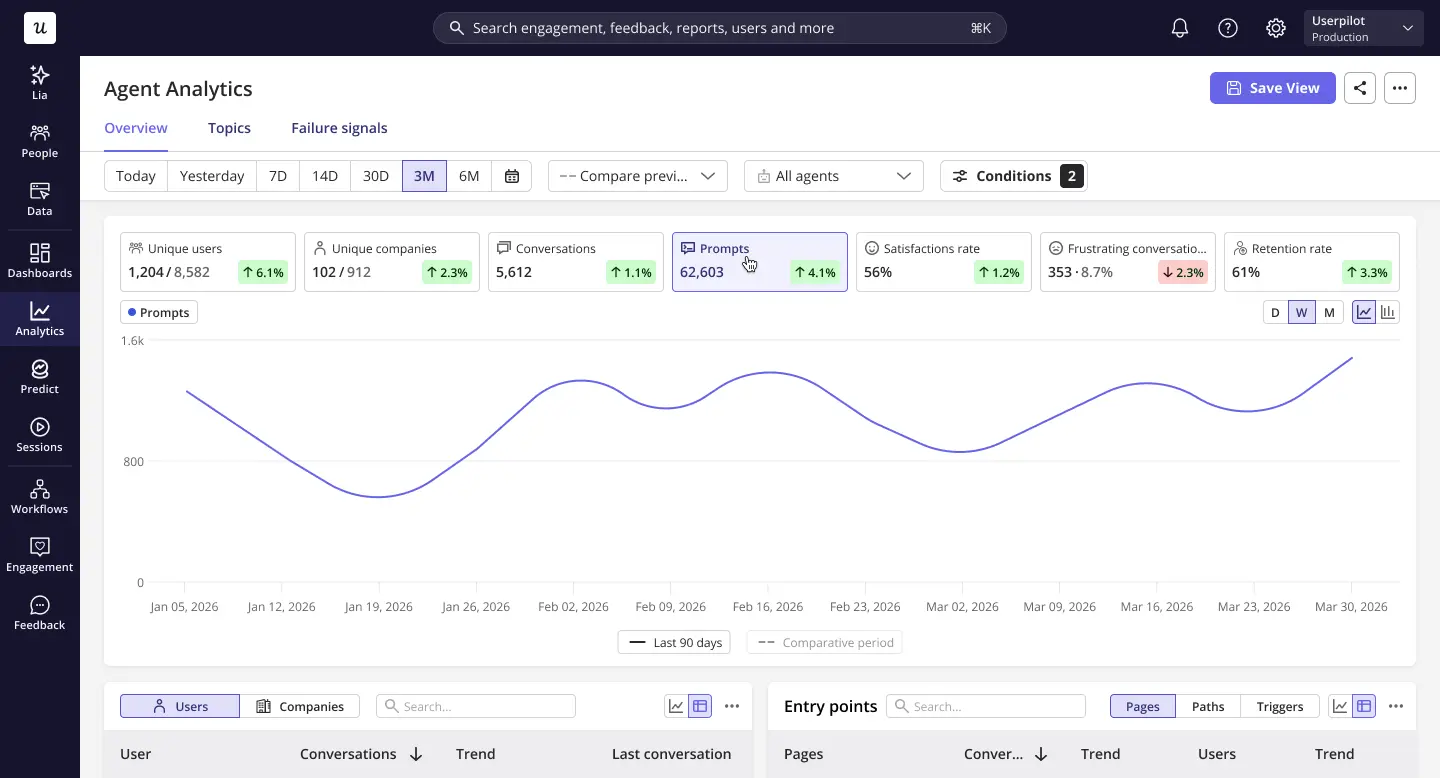
What Userpilot is great at:
- In-app NPS, CSAT, and custom surveys triggered by user behavior (event-based, not time-based)
- Product analytics: autocaptured events, funnel reports, path analysis, cohort tracking
- Session replay with analytics-linked drop-off: see exactly what users do before they leave a flow
- No-code in-app onboarding flows, tooltips, banners, and checklists — build without engineering
- Official MCP server so you can query Userpilot data from AI tools
Where it falls short: Userpilot is significantly more expensive than single-purpose feedback tools. The Starter plan at $299/month is a hard sell for early-stage startups, and pricing scales with monthly active users while capping seats per tier (3 on Starter, 15 on Growth). Userpilot publishes no annual pricing at all — monthly only — so there is no advertised annual discount to model. It also doesn’t have public-facing feedback boards or feature voting; for that, pair it with Canny.
Pricing (November 2026): Starter $299/month (3 seats, 2,000 MAU included); Growth from $849/month (15 seats, 2,000 MAU included, scaling to 100k MAU); Enterprise custom (unlimited seats, 10,000 MAU included). No free plan; 14-day free trial with no credit card required. Full pricing.
Best for: Growth-stage SaaS companies (Series A+) that want product analytics, in-app feedback, and behavioral onboarding in one tool.
5. Usersnap — Best Evidence-Trail Platform
The verdict first: Usersnap has evolved from a visual feedback widget into a product evidence platform that traces every feedback signal from source to roadmap decision to shipped feature. For teams who need to justify roadmap calls, it’s the most complete solution here — and it’s considerably more affordable than its enterprise positioning suggests.
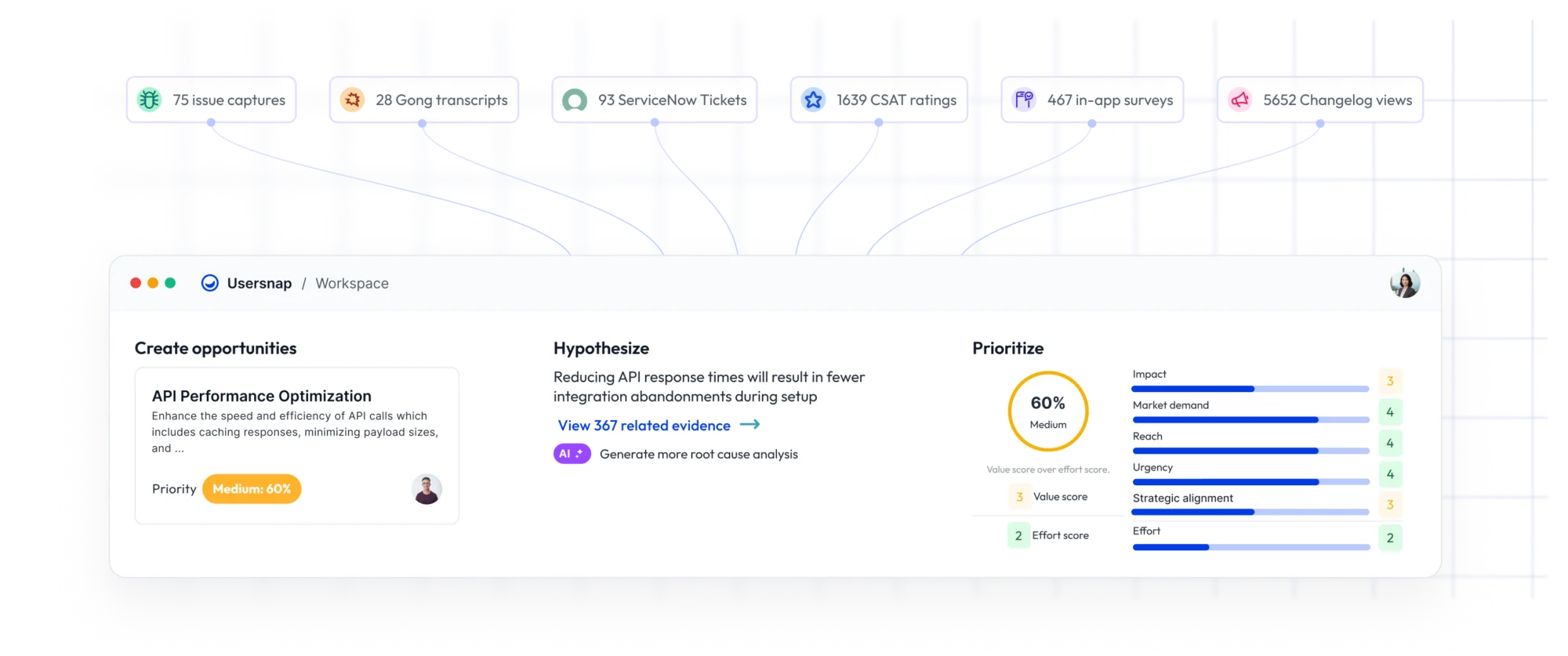
What makes Usersnap different is its focus on evidence, not just feedback. Every insight links back to the original ticket, call, or survey that created it. When a stakeholder asks “why did we build this?”, the answer is already in the system.
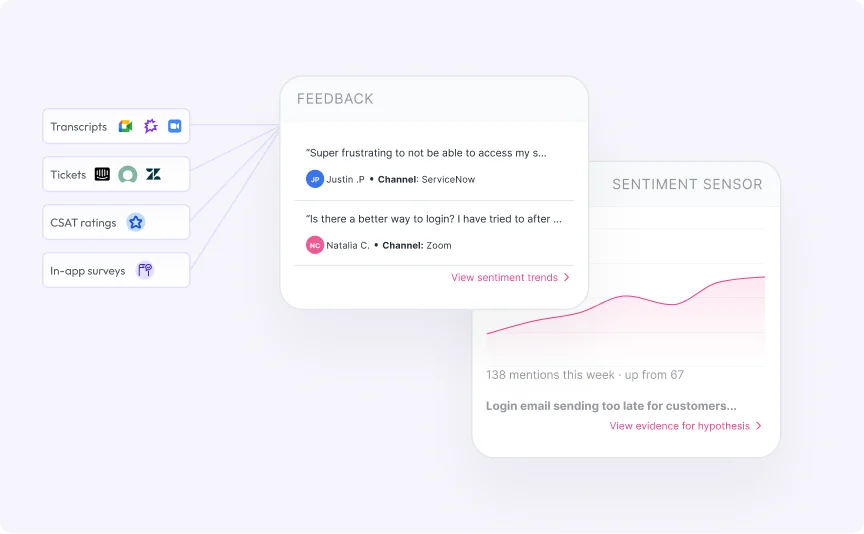
What Usersnap is great at:
- Visual screen capture: users annotate bugs and feedback directly on your app
- AI-powered taxonomy: auto-categorizes feedback into topics and tracks sentiment trends over time
- Hypothesis generation from feedback patterns, not just request counts
- Roadmap prioritization with custom scoring frameworks — weight feedback by revenue, user count, or strategic fit
- Two-way integrations with Jira, Linear, Salesforce and 50+ tools
- EU data residency: all data stored in the European Union, hosted on AWS in Frankfurt (eu-central-1)
Where it falls short: Two things to check before you commit. Pricing is in euros, not dollars, which matters if you’re budgeting in USD. And on compliance: Usersnap’s pricing page lists HIPAA/SOC 2 support as “landing soon” and Enterprise-only — its security page attributes SOC 1/SOC 2 to its AWS data centres rather than to Usersnap itself. If you need Usersnap to hold its own SOC 2 attestation today, verify that directly before signing. Onboarding is also more involved than Canny or Contentsquare.
Pricing (November 2026): Starter €49/month (2 seats, 2 projects); Growth €129/month (unlimited seats, 10 projects); Professional €219/month; Premium €459/month; Enterprise custom. A yearly billing toggle advertises saving up to 3 months, but no annual figures are published. No free plan; a free trial is offered with no credit card, though the base trial length isn’t stated. Full pricing.
Best for: B2B SaaS product teams who need to connect feedback across several channels to a defensible, evidence-backed roadmap — and who are comfortable billing in euros.
6. Refiner — Best for Targeted Micro-Surveys
The verdict first: Refiner does one thing better than anyone else on this list: in-app micro-surveys triggered by precise behavioral conditions. Want to survey users who activated Feature X within the last 7 days, are on the Pro plan, and haven’t used Feature Y? Done, in minutes, without code.
The pricing model is worth understanding up front, because it’s unusual in this group: all paid Refiner plans include unlimited survey responses. There is no per-response cap to blow through. What scales the price is monthly active users, via a slider on the pricing page.
What Refiner is great at:
- Granular behavioral targeting: survey specific user segments based on events, attributes, and plan type
- NPS, CSAT, PMF, and custom micro-surveys that feel native in your app rather than popup-style interruptions
- Unlimited survey responses on every paid plan — a real differentiator against Survicate’s capped allowances
- Webhooks and native integrations with Segment, HubSpot, Salesforce, and Amplitude
- Lightweight JS snippet — no SDK required
- A free plan that keeps all Essentials features, just capped at 25 responses a month
Where it falls short: Refiner is a specialist tool — no roadmap management, no behavioral analytics, no heatmaps. It’s a survey delivery engine, not a full feedback platform. Use it alongside Canny or Userpilot rather than instead of them. On response rates: Refiner publishes one case study citing a 57.7% response rate for a single customer, and otherwise claims only that it “helps lift response rates.” If you have seen a “3–5x higher response rate” figure attributed to Refiner, that does not appear anywhere on Refiner’s own site — treat it as unsourced.
Pricing (November 2026): Free ($0 — all Essentials features, 25 responses/month); Essentials $149/month and Growth $279/month, both at the default 5,000 MAU slider position, scaling upward with MAU; Enterprise custom. Annual billing saves approximately 17% but the exact annual figures aren’t published. Separate 30-day free trial capped at 100 survey responses, no credit card. Essentials scales to 500,000 MAU and 20 published surveys; Growth to 1,000,000 MAU and 50 surveys. Full pricing.
Best for: Product-led growth teams that need high-response in-app surveys targeting specific user cohorts, without the overhead of a full feedback platform.
7. UserVoice — Best for Enterprise Feedback Tied to CRM Revenue
The verdict first: UserVoice is the oldest tool on this list — and one of the few built specifically for large B2B software companies where feedback from a $500k customer should carry more weight than feedback from a trial user. If you have enterprise customers and complex sales cycles, UserVoice’s CRM-linked prioritization is hard to replace. It is also, by a wide margin, the most expensive option here.
What UserVoice is great at:
- Indexing — UserVoice’s named feature for ranking ideas by customer impact, revenue and demand
- Sales-to-product feedback loop: CSMs and AEs log requests from their accounts directly into UserVoice
- Customer portal where enterprise clients can see and vote on roadmap items, with access control by account
- Deep Salesforce integration: links feedback to opportunities and deals in CRM, so higher-value accounts outrank trial users
Where it falls short: Cost, primarily — UserVoice starts an order of magnitude above everything else on this list, and admin seats are billed separately on top. The UI feels dated compared to Canny and Usersnap. It also doesn’t do behavioral analytics, in-app surveys, or heatmaps — it’s purely a feedback management and roadmap tool. Note too that while UserVoice’s documentation describes revenue-based ranking behaviour, the pricing page itself makes no revenue-weighting claim; the closest official wording is that PMs can “segment and weigh an idea’s impact.”
Pricing (November 2026): Launch from $1,000/month, or $12,000 billed yearly; Business from $1,833/month, or $22,000 billed yearly; Enterprise custom. Additional admins are $40 per admin/month or $480 per admin/year. Final pricing depends on admin seats, instances and add-ons. Full pricing.
Best for: Large B2B software companies with enterprise sales cycles who need feedback tied directly to Salesforce accounts, and a budget to match.
Side-by-Side Comparison
| Tool | Best For | Free Plan / Trial | Starting Price | Key Feature |
|---|---|---|---|---|
| Canny | Feature request mgmt | Free (25 tracked users) | $79/mo yearly | Autopilot + Sort by MRR Impact |
| Hotjar / Contentsquare | Behavioral analytics | Free (200k sessions/mo) | $39/mo yearly, $49 monthly | Heatmaps + session replay |
| Survicate | Multi-channel surveys | 10-day trial, no free plan listed | $114/mo yearly (Growth) | AI Research Hub, all plans |
| Userpilot | In-app feedback + analytics | 14-day trial, no card | $299/mo (no annual published) | AI agent Lia + MCP server |
| Usersnap | Evidence trail for roadmaps | Trial, no free plan | €49/mo (euros, not USD) | Evidence trail + hypothesis gen |
| Refiner | Targeted micro-surveys | Free (25 responses/mo) + 30-day trial | $149/mo at 5k MAU | Unlimited responses, all paid plans |
| UserVoice | Enterprise CRM-linked feedback | No | From $1,000/mo ($12,000/yr) | Indexing by revenue and demand |
All pricing read from each vendor’s own pricing page on 3 November 2026. Usersnap prices are in EUR; the rest in USD. Verify before purchasing.
How to Choose the Right Tool
Start with what kind of feedback gap you actually have.
You don’t know why users churn → Start with Hotjar/Contentsquare (free). Watch session replays of users who canceled. You’ll see the problem in 30 minutes.
You’re drowning in feature requests from sales and support → Canny with Autopilot. It reads your existing conversations and extracts requests automatically. Budget for Pro if you want revenue-based prioritization.
You run regular NPS/CSAT programs and need better analysis → Survicate. The AI Research Hub connects survey responses with support ticket themes — and it’s included on every plan. Pin down the response allowance first.
You send a lot of surveys and hate response caps → Refiner. Unlimited responses on every paid plan, priced on MAU instead.
You want product analytics + in-app feedback + onboarding in one tool → Userpilot. Expensive, but it eliminates several separate subscriptions. See how it fits alongside other team productivity tools when evaluating your stack.
You need to trace roadmap decisions back to evidence → Usersnap. The “why did we build this?” question should always have a documented answer tied to real customer signals — and at €49/month the entry tier is far more accessible than its enterprise framing suggests.
You have enterprise clients and a Salesforce-heavy sales process → UserVoice, if you can justify $12,000 a year as a floor.
Frequently Asked Questions
What is the best free customer feedback tool for SaaS?
Canny offers the best free plan for feature request management — unlimited boards, 25 tracked users, 5 managers and unlimited feedback. Contentsquare (formerly Hotjar) is the best free option for behavioral data like heatmaps and session recordings, with 200,000 sessions per month on its free tier. Refiner also has a free plan that keeps all Essentials features, capped at 25 survey responses a month.
What’s the difference between Canny and Hotjar for SaaS feedback?
Canny collects and prioritizes feature requests through public voting boards and AI-powered feedback capture from support channels. Hotjar — now part of Contentsquare — focuses on behavioral feedback through heatmaps, session recordings and on-page surveys, so you can see what users do rather than only what they say they want. Most teams use both.
When did Contentsquare acquire Hotjar?
September 2021. Contentsquare announced the acquisition on 1 September 2021, and the products have since been merged — new Hotjar accounts can no longer be created, and the Hotjar feature set now sits inside Contentsquare’s Experience Analytics and Voice of Customer products.
Which customer feedback tool is best for product teams?
Userpilot is the top pick for product teams who need in-app surveys, NPS, and behavioral analytics in one platform. Canny is better if your primary need is feature request management and public roadmaps. Usersnap is the choice if you need a full evidence-to-roadmap workflow and can bill in euros.
How much do SaaS customer feedback tools cost?
There is a very wide range. Free plans are available from Canny, Contentsquare and Refiner. Paid entry points run from €49/month (Usersnap Starter) and $39/month (Contentsquare Growth, billed yearly) through $79/month (Canny Pro), $114/month (Survicate Growth), $149/month (Refiner Essentials at 5,000 MAU) and $299/month (Userpilot Starter), up to $1,000/month or $12,000/year for UserVoice Launch. Most vendors offer a free trial, and several publish only monthly rates.
Can I collect NPS surveys with these tools?
Yes. Userpilot, Survicate, Usersnap, and Refiner all include built-in NPS surveys. Survicate supports NPS via email, web, and in-app. Userpilot and Refiner specialize in behavioral-trigger surveys that fire based on user segments or events. Contentsquare includes in-app surveys too, with 100 responses a month on its free plan.
Written by the SoftwareReviewHQ team. All pricing read from each vendor’s own pricing page on 3 November 2026 and reflects published list prices, not negotiated rates. Where a vendor’s own pages disagree, this is noted in the relevant section.