CRM & Lead Management
7 Best Lead Management Software for Sales Teams in 2026
Your leads are slipping through the cracks. You know it. I know it. The question is which piece of software is going to fix that — and whether it's worth the price tag. I went through seven of the most popular lead management tools so you don't have to. Some are CRMs with strong lead […]
Your leads are slipping through the cracks. You know it. I know it. The question is which piece of software is going to fix that — and whether it’s worth the price tag.
I went through seven of the most popular lead management tools so you don’t have to. Some are CRMs with strong lead features bolted on. Some are purpose-built for the specific problem of capturing, scoring, and routing incoming prospects. And a few are surprisingly good at things you wouldn’t expect.
Here’s what I found — with actual pricing, real trade-offs, and an honest take on who each tool is actually for.
Quick note: Pricing verified from vendor pages and third-party sources in November 2026. G2 ratings current as of November 2026.
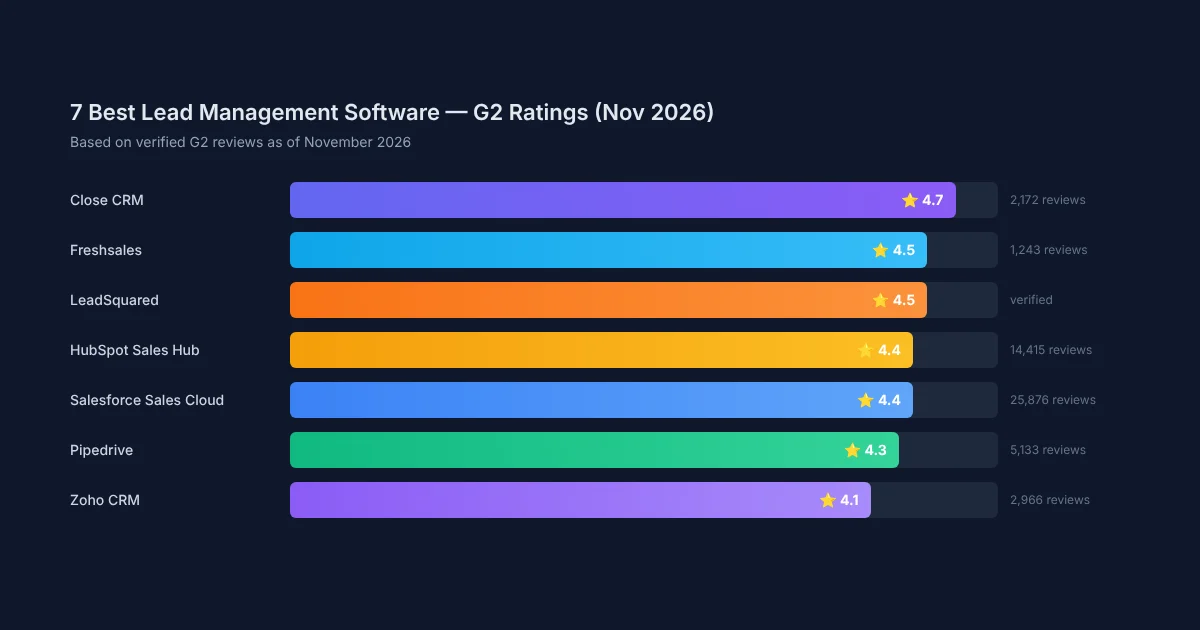
Quick Picks: Best Lead Management Software at a Glance
| Best For | Tool | Starting Price | G2 Rating |
|---|---|---|---|
| Best overall | HubSpot Sales Hub | Free; paid from $9/user/mo | 4.4/5 (14,415 reviews) |
| Enterprise teams | Salesforce Sales Cloud | $25/user/mo | 4.4/5 (25,876 reviews) |
| Pipeline tracking | Pipedrive | $14/user/mo | 4.3/5 (5,133 reviews) |
| AI lead scoring | Freshsales | $9/user/mo | 4.5/5 (1,243 reviews) |
| Tight budget | Zoho CRM | Free; paid from $14/user/mo | 4.1/5 (2,966 reviews) |
| Inside sales / calling | Close | $35/user/mo (Essentials) | 4.7/5 (2,172 reviews) |
| High-volume distribution | LeadSquared | $40/user/mo | 4.5/5 |
1. HubSpot Sales Hub — Best Overall Lead Management Software
What it is
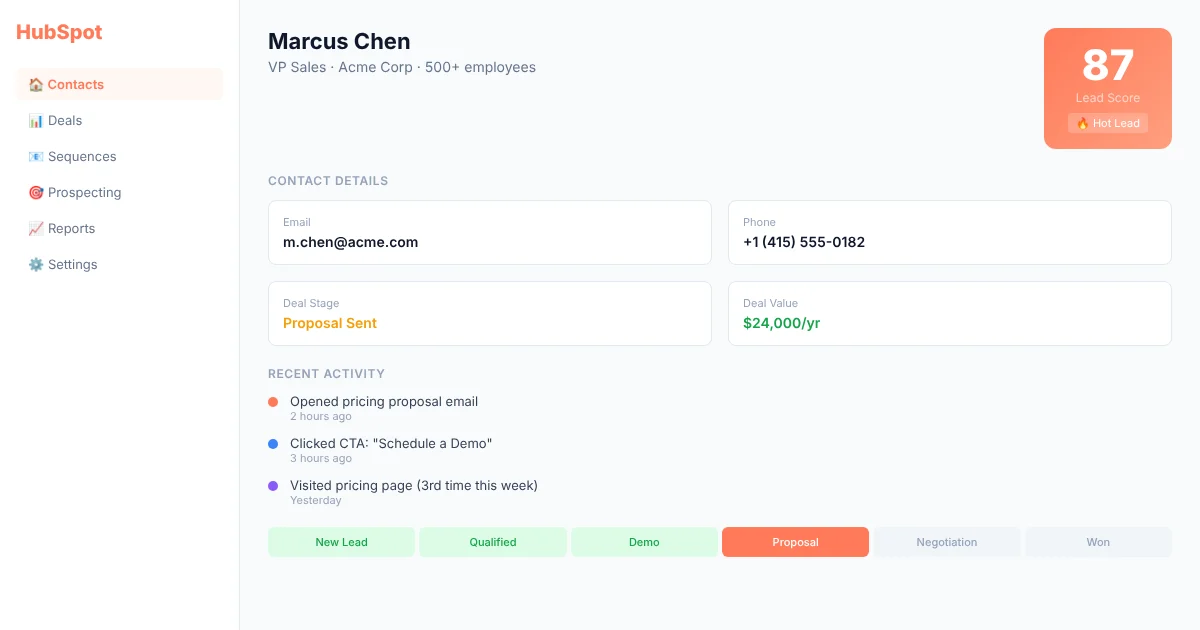
HubSpot is a customer platform that bundles CRM, sales tools, marketing, and customer service under one roof. Sales Hub — the piece relevant here — handles lead capture, scoring, routing, pipeline management, and sales automation. It’s the rare tool that works equally well for a 5-person startup and a 500-person sales org.
Key features
- Lead scoring: Score contacts based on demographic fit, website behavior, email engagement, and historical conversion data.
- Prospecting workspace: A unified view that lets reps manage all their leads, tasks, and outreach from one place instead of jumping between tabs.
- Sequences: Build multi-step follow-up cadences mixing emails, calls, and tasks — no manual scheduling required.
- Deal pipeline: Customizable stages, deal rotation, and pipeline reports that show where things are stalling.
- Automation: Route new leads by territory, deal size, or rep availability. Trigger tasks and alerts when leads hit a score threshold.
- Integrations: 1,500+ native integrations including Salesforce (if you’re in a hybrid shop), Slack, LinkedIn Sales Navigator, and Zoom.
Pricing
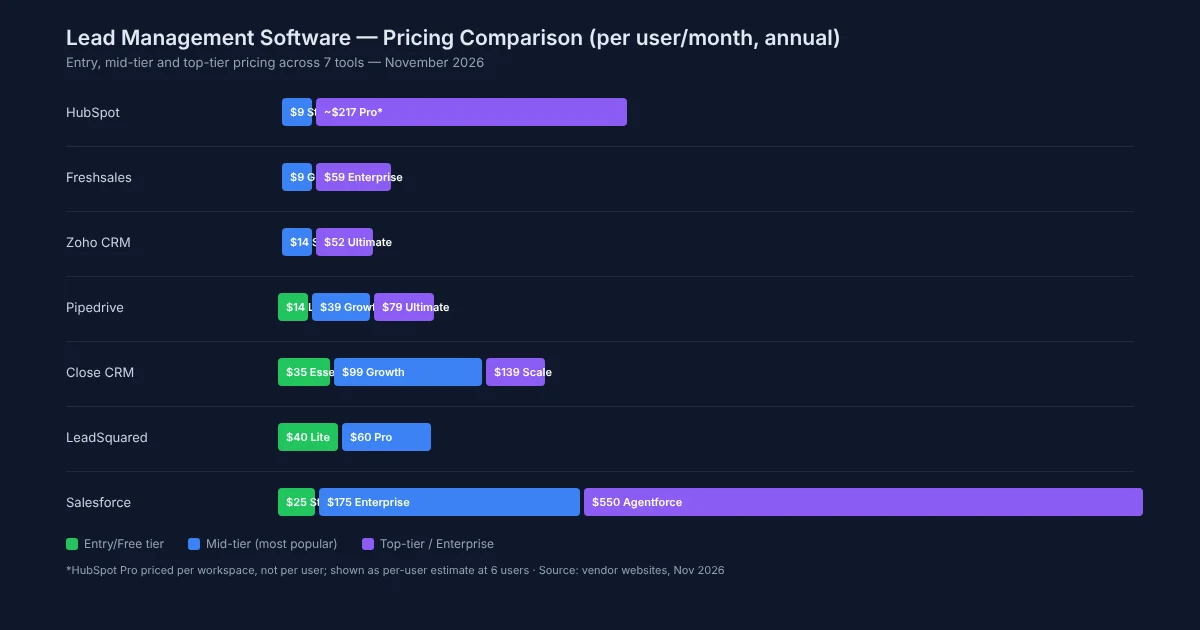
- Free: $0 (up to 2 users) — basic CRM, contact management, deal pipeline
- Starter: $9/user/month (annual) — adds email sequences, calling, meeting scheduling
- Professional: $1,300/month for up to 6 users (annual) — full automation, lead scoring, advanced reporting, prospecting tools
Heads up: Professional pricing is per-workspace, not per-user, which sounds great until you need 20 seats and start adding up the math.
✅ Pros
- Free tier is genuinely useful — not a crippled demo
- All-in-one platform means leads, emails, calls, and pipeline data live in the same place
- Gradual adoption curve — you can start simple and add complexity as your process matures
- Best-in-class reporting at Professional and above
❌ Cons
- Professional plan pricing jumps hard — going from Starter to Pro is a 10x cost increase
- Advanced lead scoring and automation aren’t available on Starter
- Can get bloated if your team only needs CRM functionality, not the full suite
🏆 Best for
Sales teams that want one platform to handle everything from first contact to closed deal — and are willing to pay for Professional once they outgrow the free tools.
The take
HubSpot is the safest default choice for most teams. The free tier buys you serious runway, the UI is genuinely intuitive, and the platform grows with you. The main trap is assuming that cheap entry pricing means cheap at scale. Once you need Professional features — especially lead scoring and advanced automation — the cost jumps significantly. Plan for that before you’re locked in.
2. Salesforce Sales Cloud — Best for Enterprise Lead Management
What it is
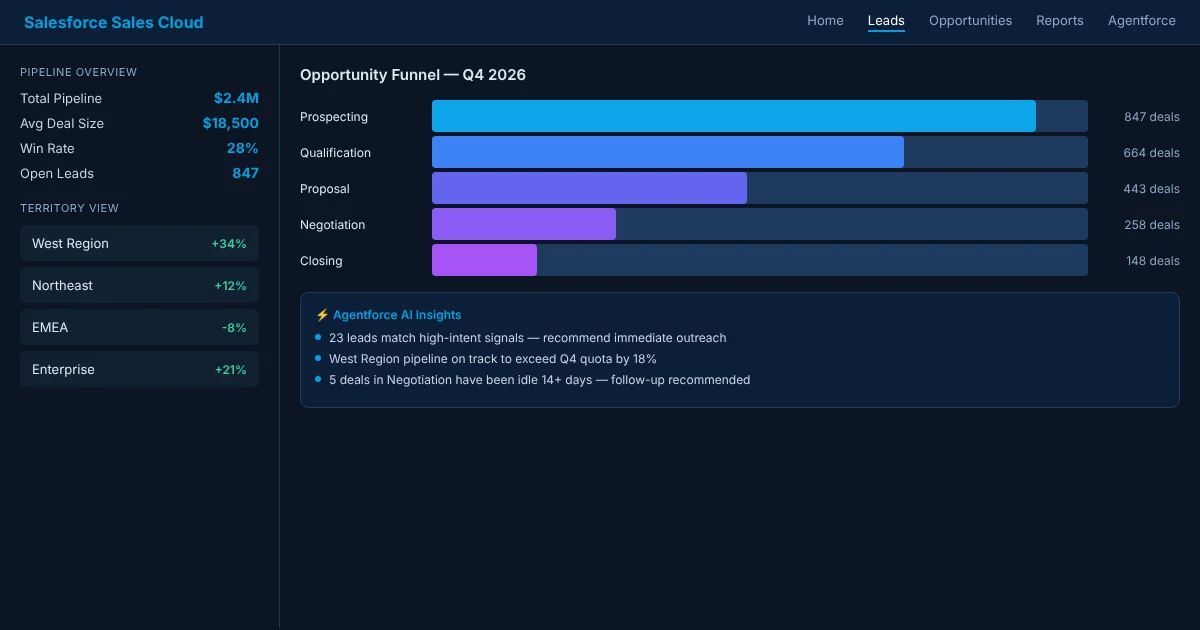
Salesforce is the market leader in enterprise CRM, and Sales Cloud is its core sales product. It handles leads, accounts, opportunities, and territory management at a level of configurability that most other tools can’t touch. If your sales process has custom rules, complex routing logic, and multiple teams with different workflows, Salesforce is built for that.
Key features
- Lead assignment rules: Route leads based on geography, industry, deal size, product interest, rep capacity, or any combination of custom criteria.
- Web-to-lead capture: Pull leads directly from your website into Salesforce with automatic field mapping and deduplication.
- Einstein lead scoring: AI-powered scoring based on your historical CRM data — not generic templates.
- Opportunity management: Detailed stage tracking, win/loss analysis, and deal collaboration tools.
- Agentforce: Salesforce’s AI agent layer — handles lead qualification, follow-up scheduling, and data enrichment automatically at higher plan tiers.
- AppExchange: 7,000+ integrations spanning every category of business software.
Pricing
- Starter Suite: $25/user/month
- Pro Suite: $100/user/month
- Enterprise: $175/user/month
- Unlimited: $350/user/month
- Agentforce 1 Sales: $550/user/month
All prices are annual billing. AI features, data products, and additional cloud modules cost extra. Build in budget for a Salesforce admin if you go Enterprise or above.
✅ Pros
- Unmatched customization — you can configure it to match almost any sales process
- Enterprise-grade compliance, security, and permission controls
- Strongest ecosystem of integrations, consulting partners, and implementation resources
- Scales from regional team to global enterprise without switching platforms
❌ Cons
- Expensive — the entry price is deceptive; real enterprise deployments cost significantly more
- Setup complexity is high; most orgs need a dedicated Salesforce admin or consultant
- Overkill for small and mid-sized teams with simple lead processes
- UI feels dated compared to newer tools
🏆 Best for
Enterprise sales organizations with complex territory structures, multiple teams, custom routing rules, and an existing Salesforce ecosystem they’re already invested in.
The take
Salesforce is the right answer if you’re running enterprise-scale sales operations. It’s the wrong answer if you’re a 15-person B2B team looking for something that just works without a six-month implementation project. For most mid-market companies, HubSpot Professional or Pipedrive give you 80% of the functionality at 20% of the cost and complexity.
3. Pipedrive — Best for Pipeline-Focused Sales Teams
What it is
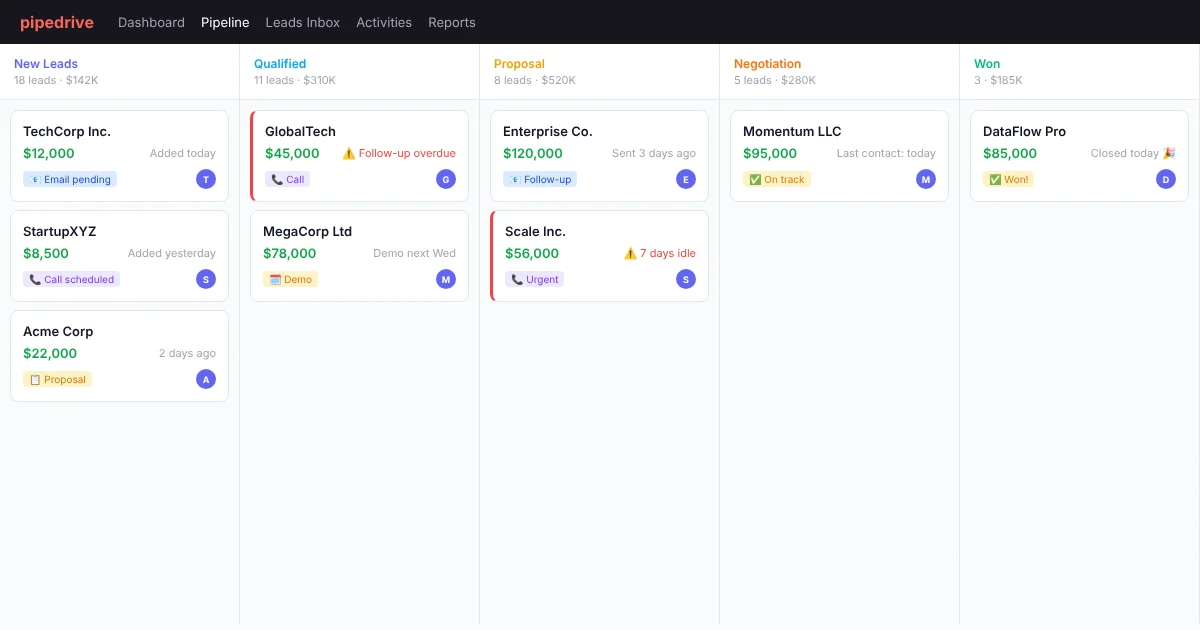
Pipedrive is a CRM built specifically around the sales pipeline. Where most CRMs bury you in tabs and menus, Pipedrive puts the visual pipeline front and center. Reps see exactly where every deal sits, what activity is overdue, and what needs to happen next. It’s not the most feature-rich option here — but that’s intentional.
Key features
- Visual drag-and-drop pipeline: Move deals between stages with one click. Create multiple pipelines for different products or regions.
- Leads inbox: A separate holding area for unqualified leads that keeps your pipeline clean — only qualified opportunities make it in.
- Smart contact data: Auto-enriches contact records using public data sources when you add a name and email.
- Workflow automation: Trigger actions when deals move stages, go idle, or hit a close date — no manual nudging required.
- LeadBooster add-on: Web forms, chatbot, live chat, and a prospecting database you can query by job title, company, and geography.
- Activity reminders: Never miss a follow-up with automated scheduling and overdue task alerts.
Pricing
- Lite: $14/user/month (annual)
- Growth: $39/user/month (annual)
- Premium: $59/user/month (annual)
- Ultimate: $79/user/month (annual)
LeadBooster and Prospector are add-ons. Some features like custom scoring and lead routing require Growth tier or above.
✅ Pros
- Cleanest visual pipeline of any tool on this list — reps actually use it daily
- Quick setup — most teams are running in an afternoon, not a week
- Strong activity and follow-up management keeps reps accountable
- Reasonable price for the core functionality
❌ Cons
- Lead management depth is limited compared to HubSpot or Salesforce — scoring and routing require higher plans or add-ons
- Not built for enterprise-level territory management or complex routing rules
- Reporting is functional but not as powerful as HubSpot or Salesforce
- No built-in phone or calling system
🏆 Best for
Sales teams of 5–50 people whose main problem is pipeline visibility and rep accountability — not complex lead routing or high-volume distribution.
The take
Pipedrive solves a specific problem really well: making sure reps actually work their pipeline instead of losing track of deals in a cluttered CRM. If your biggest issue is deals going cold because follow-up falls through the cracks, Pipedrive fixes that immediately. If you need advanced lead scoring, territory-based routing, or marketing automation integration, you’ll hit its ceiling fast.
4. Freshsales — Best for AI-Powered Lead Scoring
What it is
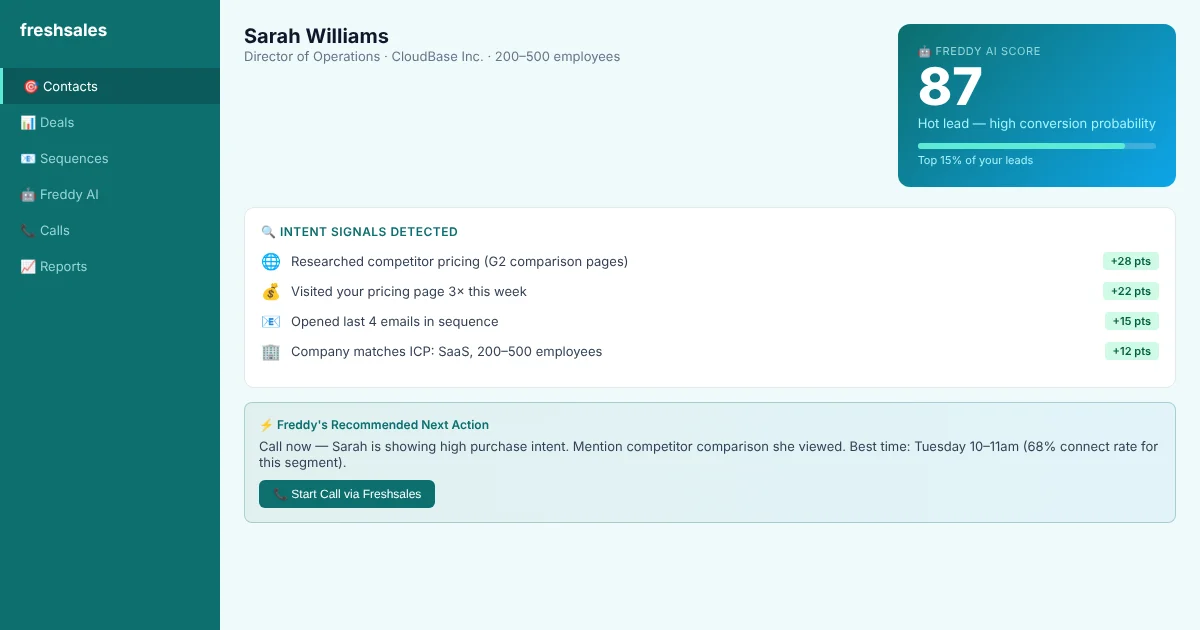
Freshsales is Freshworks’ CRM for sales teams. The standout feature is Freddy AI — a scoring and prioritization engine that ranks leads based on historical conversion patterns from your own CRM data, not generic templates. It also bundles email, phone, and chat natively, so reps don’t have to context-switch between tools to follow up.
Key features
- Freddy AI contact scoring: Scores every lead 1–100 based on historical CRM data. Shows which signals correlate with conversion in your specific sales motion.
- Intent scoring: Surfaces accounts actively researching relevant topics — identifies purchase intent before reps reach out.
- Built-in phone, email, chat: Reps can call, email, and chat from inside Freshsales without switching apps. All activity logs automatically to the contact record.
- Lead routing: Assign incoming leads by territory, language, deal size, or rep availability with automated rules.
- Sales sequences: Build multi-step cadences mixing calls, emails, and SMS — pause or skip based on lead behavior.
- Deal pipeline: Customizable stages with pipeline health reports and stale deal alerts.
Pricing
- Free: Up to 3 users (basic CRM only)
- Growth: $9/user/month (annual)
- Pro: $39/user/month (annual)
- Enterprise: $59/user/month (annual)
Note: Freddy AI scoring and intent features are on Pro and above. The Growth plan is a solid entry point, but you’ll want Pro for the full AI experience.
✅ Pros
- AI scoring that learns from your actual data — not generic demographics
- Built-in communications mean lead activity and outreach history live together
- Competitive pricing vs. HubSpot at similar feature tiers
- Easier to set up and administer than Salesforce
- Free trial: 21 days
❌ Cons
- Smaller integration ecosystem than HubSpot or Salesforce
- Advanced AI features require Pro plan — Growth is fairly limited on this front
- Reporting less flexible than HubSpot’s
- Mobile app gets mixed reviews
🏆 Best for
Sales teams with more inbound leads than reps can manually evaluate — where AI prioritization directly translates to better rep time allocation and faster follow-up.
The take
Freshsales is the most underrated tool on this list. It consistently scores higher on G2 ease-of-use ratings than HubSpot, costs less at comparable feature levels, and the AI scoring actually works because it’s trained on your historical data. The main reason it doesn’t get more attention is brand recognition — Freshworks doesn’t have HubSpot’s marketing budget. Worth a serious look before you commit to anything more expensive.
5. Zoho CRM — Best Budget Lead Management Option
What it is
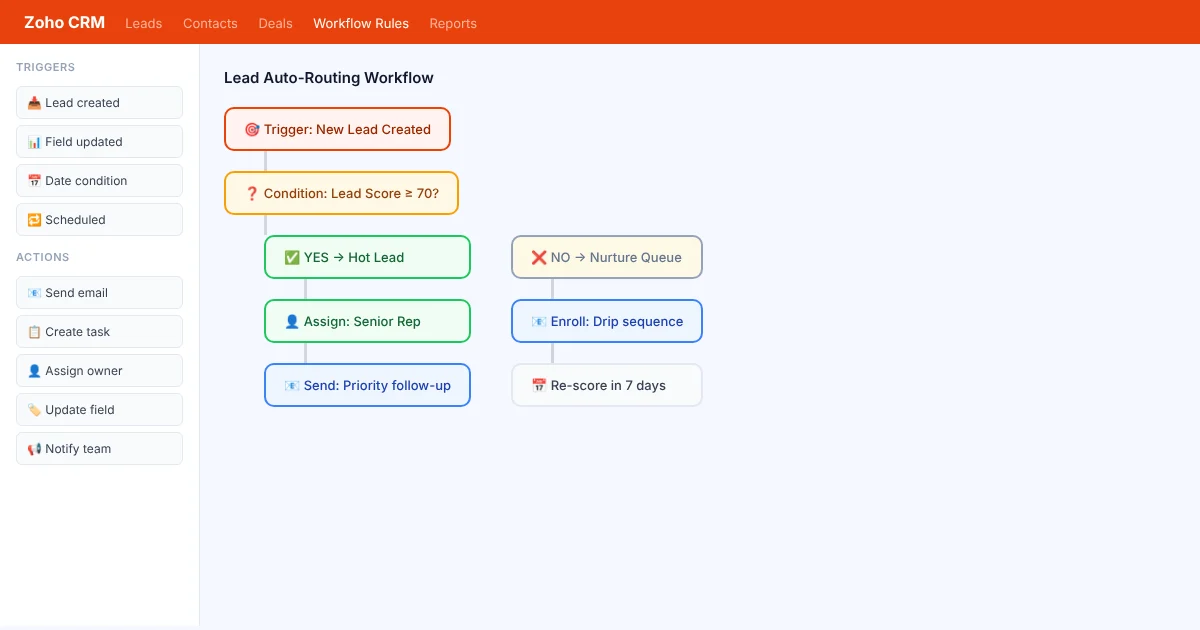
Zoho CRM is the budget-friendly power player. For the price, it offers a surprising depth of lead management features: scoring, workflow automation, assignment rules, territory management, and a Blueprint tool for designing and enforcing repeatable sales processes. It’s not as polished as HubSpot, but it covers way more ground than you’d expect at this price point.
Key features
- Lead scoring: Score leads by field values, activity, demographic fit, and engagement — plus positive and negative scoring rules.
- Assignment rules: Route leads automatically by territory, product, source, or any custom criteria.
- Blueprint: Define the exact steps a rep must complete at each pipeline stage — enforces process compliance without micromanaging.
- Workflow automation: Trigger emails, tasks, field updates, and notifications based on lead actions or time delays.
- Zia AI assistant: AI-powered suggestions for the best time to contact leads, anomaly detection, and enrichment recommendations.
- Zoho ecosystem: Native integration with Zoho Campaigns, Zoho Desk, Zoho Books, and 50+ other Zoho products — a full business stack at Zoho pricing.
Pricing
- Free: Up to 3 users
- Standard: $14/user/month (annual)
- Professional: $23/user/month (annual)
- Enterprise: $40/user/month (annual)
- Ultimate: $52/user/month (annual)
✅ Pros
- Best value for the feature set — genuinely impressive automation depth at $14-$23/user
- Free plan allows real usage, not just a demo
- Strong Zoho ecosystem if you’re using other Zoho products
- Blueprint is a genuinely useful process management tool
❌ Cons
- UI is denser and less intuitive than HubSpot or Pipedrive — higher learning curve
- Setup and configuration takes more effort than simpler CRMs
- Support quality is inconsistent
- G2 score (4.1/5) is the lowest of this group — reflects usability frustrations more than core functionality
🏆 Best for
Cost-conscious teams that want real automation depth without enterprise pricing — especially if you’re already using other Zoho products.
The take
Zoho CRM is the unglamorous workhorse of this list. The UI won’t win any design awards, and the learning curve is steeper than it should be. But if you’re willing to put in the setup time, you get a genuinely powerful lead management system at a fraction of what HubSpot charges. For budget-constrained teams that need actual automation — not just pretty pipelines — Zoho deserves serious consideration.
6. Close — Best for Inside Sales and Calling-Focused Teams
What it is
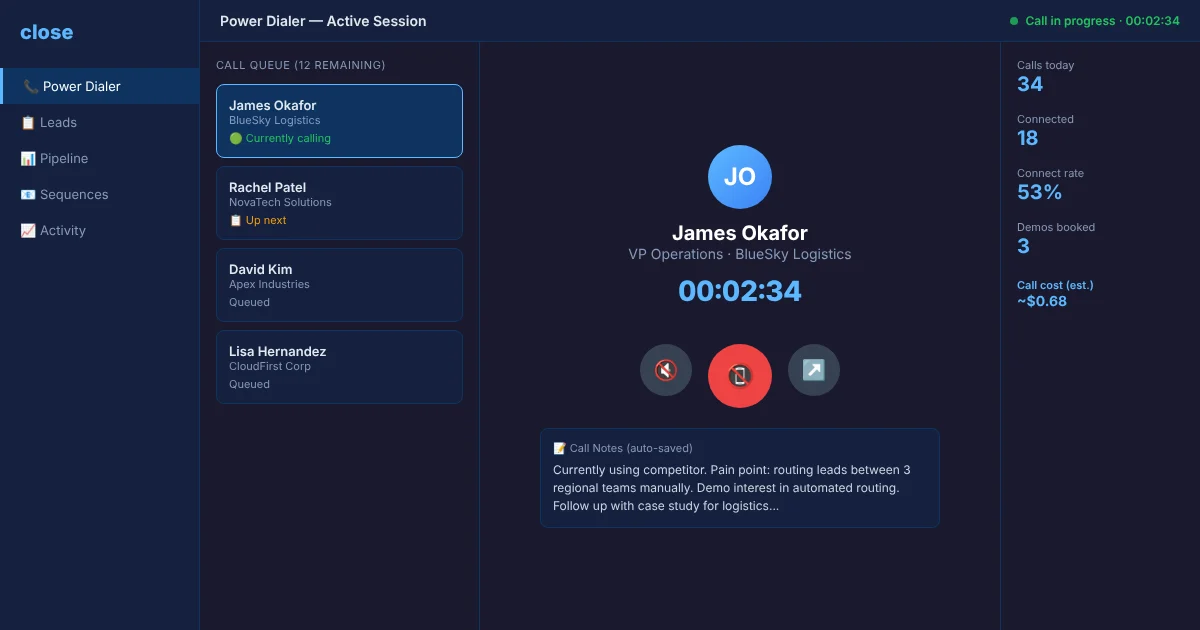
Close is a CRM built for inside sales teams that live on the phone and email. While most CRMs treat calling as an afterthought (or an expensive add-on), Close bakes it in at the core. Every plan includes calling, SMS, and email tracking. The power and predictive dialers on higher plans let reps work through lead lists at a speed that traditional CRMs simply can’t match.
Key features
- Built-in calling: Make calls directly from the CRM — all calls recorded, logged, and timestamped automatically. No third-party calling integration required.
- Power dialer: Queue up lead lists and dial them sequentially — skips unanswered calls, moves to the next lead automatically. Available on Growth and above.
- Predictive dialer: Dials multiple leads at once and connects reps only when someone picks up — maximizes live conversation time. Available on Scale.
- AI call summaries: Generates automatic summaries after each call, pulling out next steps and key talking points. Each seat includes 500–2,000 AI credits/month.
- Smart lead views: Filter and sort leads by any combination of fields — activity date, score, pipeline stage, custom tags — to build targeted calling lists.
- Workflow automation: Available on Growth and above — trigger tasks, emails, and status changes based on call outcomes or time delays.
Pricing
- Solo: $9/user/month (annual) — 1 user only, 10,000 leads, no workflows
- Essentials: $35/user/month (annual) — unlimited contacts, calling, email, SMS; no workflows
- Growth: $99/user/month (annual) — adds workflows, power dialer, bulk email
- Scale: $139/user/month (annual) — adds predictive dialer, role-based permissions, live call coaching
Calls and SMS are billed at cost on top of the seat price (~$0.02/minute for outbound calls). Workflows require Growth plan — Essentials is fairly limited on automation.
✅ Pros
- Highest G2 rating on this list (4.7/5) — users consistently love it
- Built-in calling and SMS without integration complexity or extra cost per connection
- Power dialer dramatically increases rep productivity for outbound-heavy teams
- AI call summaries save significant post-call admin time
- 14-day free trial, no credit card required
❌ Cons
- Calling costs are extra — heavy dialers should factor this into the total cost calculation
- Growth plan ($99/user/mo) is a big jump from Essentials ($35/user/mo)
- Workflows not available until Growth — Essentials is limited for automation-heavy teams
- Less suited to complex CRM needs or marketing automation integration
🏆 Best for
Inside sales teams where phone is the primary outreach channel — SDR/BDR teams, high-volume outbound operations, and any team where rep call activity is a key metric.
The take
Close has the highest G2 rating on this list (4.7/5 across 2,172 reviews) and it’s not an accident. For teams that do serious phone outreach, it’s genuinely transformative — the dialer alone can double the number of conversations a rep has in a day. The catch is that it’s optimized for one use case. If your sales process is mostly email-driven or you need heavy marketing automation, it’s the wrong fit. But for inside sales teams living on the phone? It’s hard to beat.
7. LeadSquared — Best for High-Volume Lead Distribution
What it is
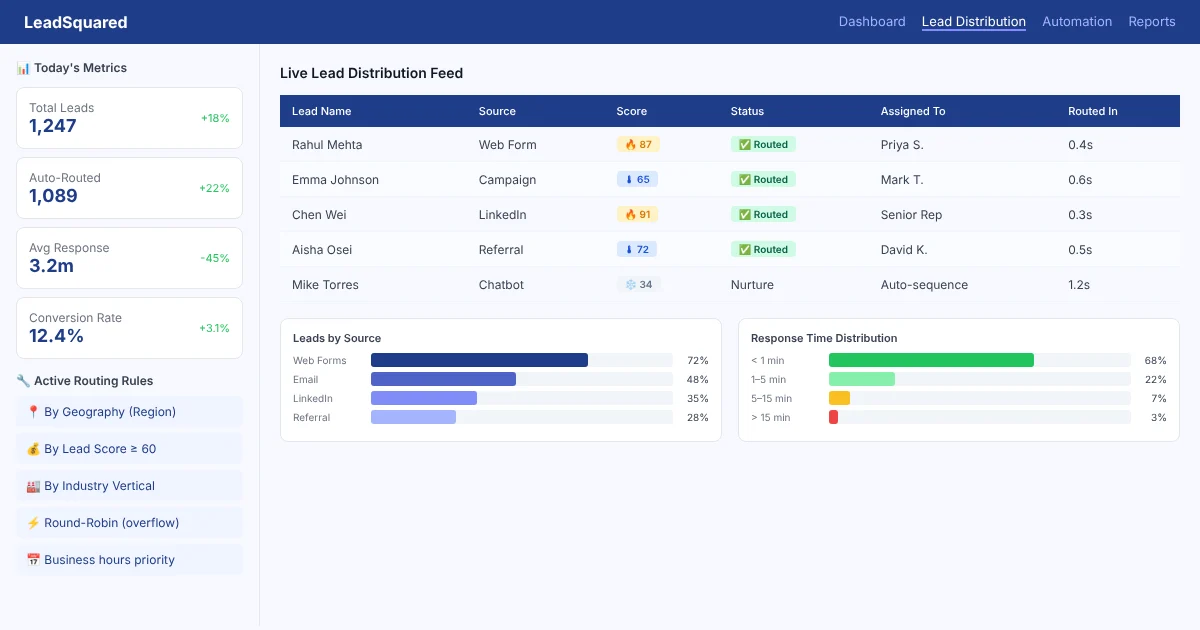
LeadSquared is a sales execution and lead management platform built specifically for organizations where lead volume is the core challenge. We’re talking education companies handling thousands of student inquiries, financial services firms managing loan applications, healthcare organizations routing patient leads, and real estate portals distributing property inquiries. Standard CRMs start to buckle at this volume — LeadSquared is designed for it.
Key features
- Advanced lead distribution: Route leads by territory, language, product, rep capacity, assignment quotas, and custom rules — handling thousands of assignments automatically.
- Assignment quotas: Limit how many leads each rep or team receives in a time period — prevents overloading while ensuring even distribution.
- Smart Views: Pre-built filtered views show reps exactly which leads need attention right now — based on score, recency, and activity.
- Field sales mobile CRM: Purpose-built mobile app for field reps — check-ins, route optimization, and offline lead access.
- Bulk lead capture: Import from forms, portals, marketplaces, offline events, and APIs simultaneously at scale.
- Speed-to-lead tracking: Measure and report on how fast leads get assigned and first contacted — critical for high-volume operations where speed determines conversion.
Pricing
- Sales Pro: $40/user/month
- Sales Super: $60/user/month
US pricing listed. Final pricing may vary by region and contract size. Some features sold separately.
✅ Pros
- Built for the specific problem of high-volume lead management — not bolted on to a generic CRM
- Advanced distribution and routing that standard tools can’t replicate
- Field sales capabilities most competitors lack
- Strong in industries where speed-to-lead is a primary conversion lever
❌ Cons
- Overkill for small-to-mid teams that don’t have volume problems
- Setup and implementation is more complex than most CRMs on this list
- US pricing not fully transparent — requires a sales conversation to get a final quote
- Less polished UI than HubSpot or Pipedrive
🏆 Best for
Organizations handling thousands of leads per month across multiple teams, territories, or channels — where manual assignment is impossible and routing speed directly affects conversion rates.
The take
LeadSquared is a niche tool that solves a niche problem brilliantly. If you’re a 10-person B2B SaaS team, this is not your tool. If you’re running a university admissions office handling 15,000 annual inquiries across five offices, or a mortgage broker distributing leads to 200 loan officers, it might be the most important software you deploy this year.
Lead Management Software: Side-by-Side Comparison
| Tool | Starting Price (annual) | G2 Rating | Lead Scoring | Automated Routing | Built-in Calling | AI Features | Free Plan |
|---|---|---|---|---|---|---|---|
| HubSpot | Free; $9/user/mo | 4.4/5 (14,415) | ✅ Pro+ | ✅ Pro+ | ✅ Starter+ | ✅ Pro+ | ✅ 2 users |
| Salesforce | $25/user/mo | 4.4/5 (25,876) | ✅ Einstein | ✅ All tiers | ❌ Add-on | ✅ Higher tiers | ❌ |
| Pipedrive | $14/user/mo | 4.3/5 (5,133) | ✅ Growth+ | ✅ Growth+ | ❌ No native | Limited | ❌ |
| Freshsales | Free; $9/user/mo | 4.5/5 (1,243) | ✅ Freddy AI | ✅ All paid | ✅ All paid | ✅ Freddy AI | ✅ 3 users |
| Zoho CRM | Free; $14/user/mo | 4.1/5 (2,966) | ✅ Standard+ | ✅ Pro+ | ❌ Integration | ✅ Zia | ✅ 3 users |
| Close | $35/user/mo | 4.7/5 (2,172) | Basic | Limited | ✅ All plans | ✅ AI summaries | ❌ |
| LeadSquared | $40/user/mo | 4.5/5 | ✅ | ✅ Advanced | ✅ Integration | Limited | ❌ |
G2 ratings sourced from G2.com, November 2026. Pricing from vendor pages and third-party sources, November 2026. ✅ = included at indicated tier, ❌ = not natively included.
How to Choose the Right Lead Management Software
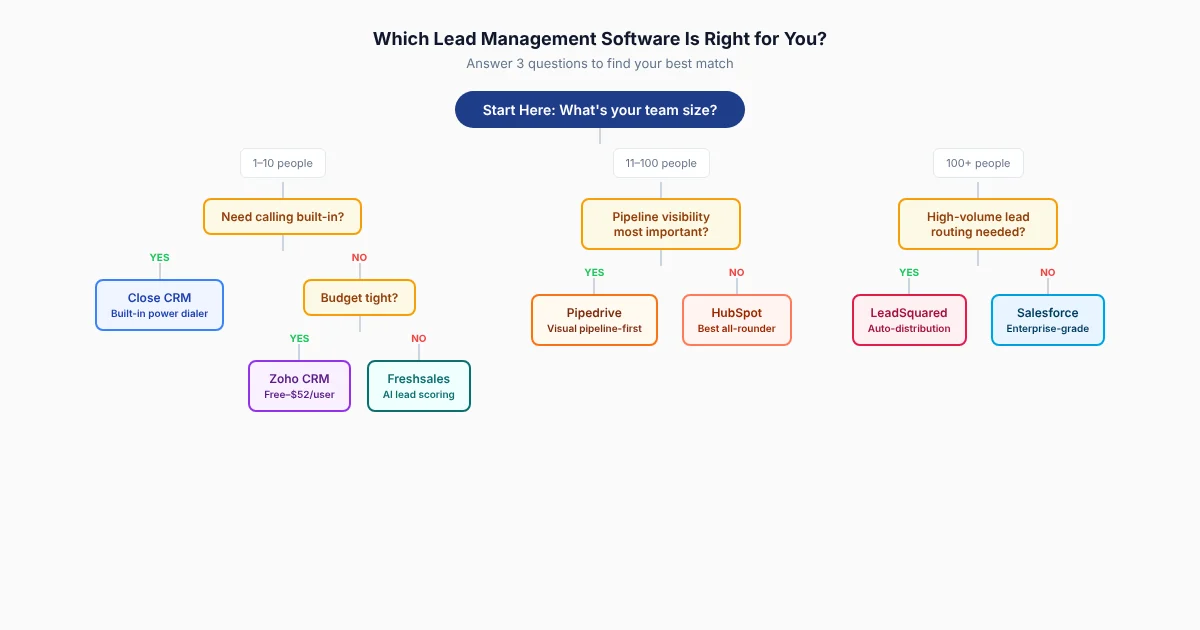
Picking the wrong tool is expensive — not just financially, but in adoption time, rep frustration, and the momentum you lose during migration. Here’s how to avoid it:
Start with your actual problem, not the feature list
Every tool on this list has a comparison table that makes it look good. What matters is what breaks down in your current process. Is it lead capture? Routing? Rep follow-through? Scoring? Pick the tool that solves that specific problem well, not the one with the most checkboxes.
Match the tool to your lead volume and complexity
Under 500 leads/month with a simple process? HubSpot free or Pipedrive Lite handles this fine. 5,000+ leads/month routing across territories? You need LeadSquared or Salesforce’s enterprise routing. Getting this wrong in either direction is a problem — underpowered tools create chaos at scale; overpowered tools create expensive complexity where none is needed.
Think about how your reps actually work
Phone-first teams should seriously consider Close — the calling infrastructure alone justifies the price. Email-first teams will get more value from HubSpot or Freshsales where sequencing and tracking are core. If your reps spend their day staring at a pipeline board, Pipedrive’s visual design keeps them from avoiding the tool.
Calculate the full cost, not the entry price
The advertised per-user price rarely tells the whole story. HubSpot’s Professional plan pricing is per-workspace with 6 seats, not per-user. Salesforce charges extra for AI, calling, and enrichment. Close bills calling costs separately. Zoho’s true cost depends on which of its many modules you actually need. Build out the full cost for your likely team size and feature requirements before making a decision.
Run a real trial — with your data
HubSpot, Freshsales, Pipedrive, Zoho, and Close all offer free trials or free tiers. Import a sample of your actual leads and run the tool against your real workflow for two weeks. The tool that gets used is always the right tool — no matter what the feature comparison says.
The Verdict
If you need one recommendation: start with HubSpot. The free tier is real, the learning curve is manageable, and it scales with you. For the majority of B2B sales teams, it handles everything you need.
If you’re budget-constrained: Freshsales gives you better AI lead scoring at a lower price point than HubSpot, with native calling included. It’s the most underrated tool in this category.
If your reps live on the phone: Close is not optional. Nothing else on this list comes close (pun intended) on call efficiency.
If you’re managing enterprise sales: Salesforce remains the standard for good reason — just go in with eyes open about implementation cost and admin overhead.
And if you’re drowning in lead volume: LeadSquared was built for exactly your problem. Standard CRMs will just make it worse.
Frequently Asked Questions
What is lead management software?
Lead management software helps sales teams capture, track, score, assign, nurture, and convert prospects. It typically sits at the top of the sales funnel — handling the transition from “interested contact” to “qualified opportunity” that then moves into full CRM or opportunity management.
What’s the difference between lead management software and a CRM?
Lead management focuses specifically on prospects — capturing them, qualifying them, scoring them, and routing them to the right rep. CRM software is broader, covering the full customer lifecycle including existing customers, accounts, and post-sale activity. Many CRMs (HubSpot, Salesforce, Pipedrive) include lead management features; dedicated tools like LeadSquared focus exclusively on the lead phase.
What features matter most in lead management software?
The features that matter depend on your specific problem. For high-inbound-volume teams, automated routing and lead scoring matter most. For outbound-heavy teams, calling tools, sequences, and rep activity tracking are more important. For teams with pipeline visibility problems, visual pipelines and follow-up reminders make the biggest difference.
Can I use a free lead management tool?
HubSpot and Freshsales both offer free plans that are genuinely usable — not just feature-crippled demos. HubSpot’s free tier supports up to 2 users with basic lead management and pipeline tools. Freshsales free supports up to 3 users. Zoho CRM also offers a free plan for 3 users. These are real starting points, not bait-and-switch free tiers.
How much does lead management software cost?
Expect to pay $9–$60/user/month for mid-tier plans from established tools. Entry-level plans run $9–$35/user/month. Enterprise pricing (Salesforce, LeadSquared) starts at $25–$40 and goes up significantly. Total cost of ownership often includes onboarding fees, calling costs, add-ons, and admin overhead — especially at the enterprise level.
What is lead scoring?
Lead scoring assigns a numerical value to each lead based on how likely they are to convert. Scores can factor in company size, job title, website behavior, email engagement, intent signals, and historical patterns from your own CRM data. AI-powered scoring (Freshsales Freddy, HubSpot, Einstein) learns from your past conversion data to weight factors that actually predict outcomes in your specific sales motion.
What is lead routing?
Lead routing is the process of automatically assigning incoming leads to the right sales rep or team. Routing rules can be based on geography, territory, product interest, language, deal size, rep availability, assignment quotas, or any custom criteria. Good routing reduces the time between a lead entering the system and a rep making first contact — which directly impacts conversion rates.
Which lead management software is best for small businesses?
HubSpot’s free plan is the go-to starting point for small businesses — it’s genuinely useful and scales as you grow. Freshsales is the better choice if you need AI scoring early and want to avoid HubSpot’s steep Professional plan pricing. Pipedrive works well for small teams focused on pipeline tracking. Zoho CRM is the best option if you need automation depth on a tight budget.
Is Salesforce worth it for lead management?
For most small and mid-sized teams, no — the complexity and cost are hard to justify unless you’re already embedded in the Salesforce ecosystem or running enterprise-scale sales operations. HubSpot, Freshsales, or Pipedrive deliver comparable lead management functionality at a fraction of the total cost and implementation overhead. For large enterprises with complex territory management, compliance requirements, and existing Salesforce infrastructure, it’s often the right call.